Best Claude skills for video and animation (2026)
Ten skills that teach Claude to build and edit videos, ranked: what each one does, what it needs, and how to install it.

Zouhair Majzoub · Founder
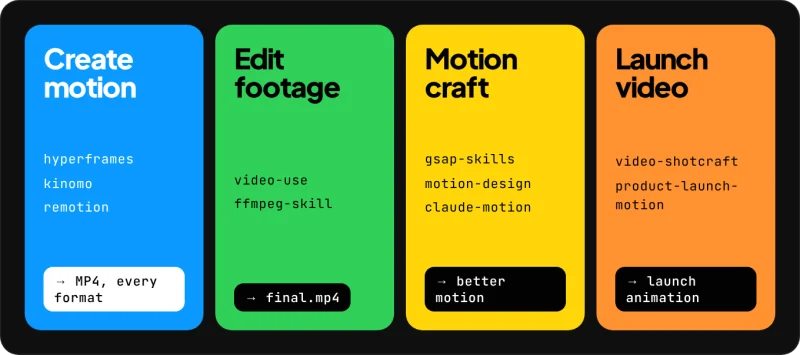
The Claude skills worth installing for video in 2026 fall into four jobs: creating motion (HyperFrames, Kinomo, Remotion), editing real footage (video-use, ffmpeg-skill), learning motion craft (GSAP, LottieFiles' motion-design-skill) and making product launch videos (video-shotcraft, product-launch-motion). None of them makes Claude generate footage: each one teaches Claude to build a video with a specific engine, and each needs that engine to produce anything.
We make one of them. Kinomo's skill drives a native Mac app where you watch every change your agent makes, live, and retouch it by hand. We've ranked it among the others and say below when another skill is the better choice.
What is a Claude skill?
A skill is a packaged set of instructions that Claude loads when a task calls for it. Anthropic's platform documentation describes Agent Skills as "modular capabilities that extend Claude's functionality", each one packaging "instructions, metadata, and optional resources (scripts, templates)" (Claude Docs, Agent Skills overview, retrieved 2026-11-18).
The format is a folder holding a SKILL.md file: a YAML header (name, description), then Markdown instructions, with longer material in files next to it.
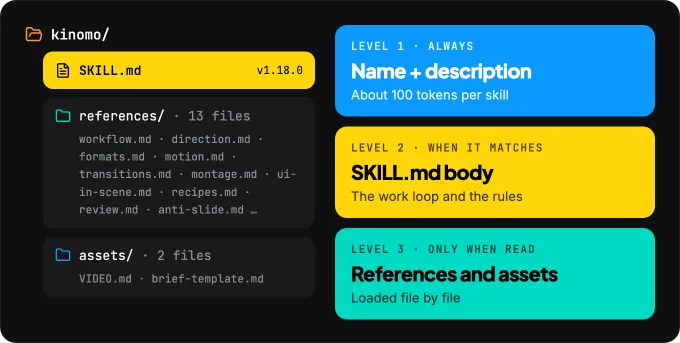
What makes skills cheap to keep around is progressive disclosure. Anthropic's documentation splits loading into three levels: the name and description are always in context (about 100 tokens per skill), the body of SKILL.md loads when your request matches the description, and bundled files load only when Claude reads them. Installing several video skills adds little to an unrelated coding session.
HyperFrames, Remotion's skills and ffmpeg-skill also work in Codex and Cursor. For the wider picture, from code frameworks to generators, read Can Claude make videos?
How to install a Claude skill
Where a skill goes depends on which Claude you use, and skills don't sync between surfaces (Claude Docs).
- Claude Code reads personal skills from
~/.claude/skills/<skill-name>/SKILL.mdand project skills from.claude/skills/; a plugin bundles several skills, invoked as/plugin-name:skill-name(Claude Code Docs, Skills). Many skills in this list install withnpx skills add <owner>/<repo>, the open skills CLI, which copies the folders for you. - Claude's apps (claude.ai and desktop) need Code execution and file creation turned on in Settings › Capabilities; then open Customize › Skills, click +, choose Upload a skill and select a ZIP (Claude Help Center).
Anthropic's documentation asks you to use skills "only from trusted sources", because a malicious skill can direct Claude to run code it shouldn't. Read the SKILL.md and any scripts before installing, as you would review a package.
The best Claude skills for video and animation, ranked
How we chose. We kept skills that have a public README with an install path, produce a video file or teach motion that ends up in one, and are maintained. We ranked them by how much of a video they cover and how mature their documentation is; it's a judgment, not a benchmark. Kinomo is our product; its skill ships inside the app rather than in a public repo, so we describe it from its own documentation. GitHub stars and skills.sh install counts are rounded, as displayed on November 18, 2026 (skills.sh doesn't say over which period it counts).
Create motion
1. HyperFrames skills (HeyGen)
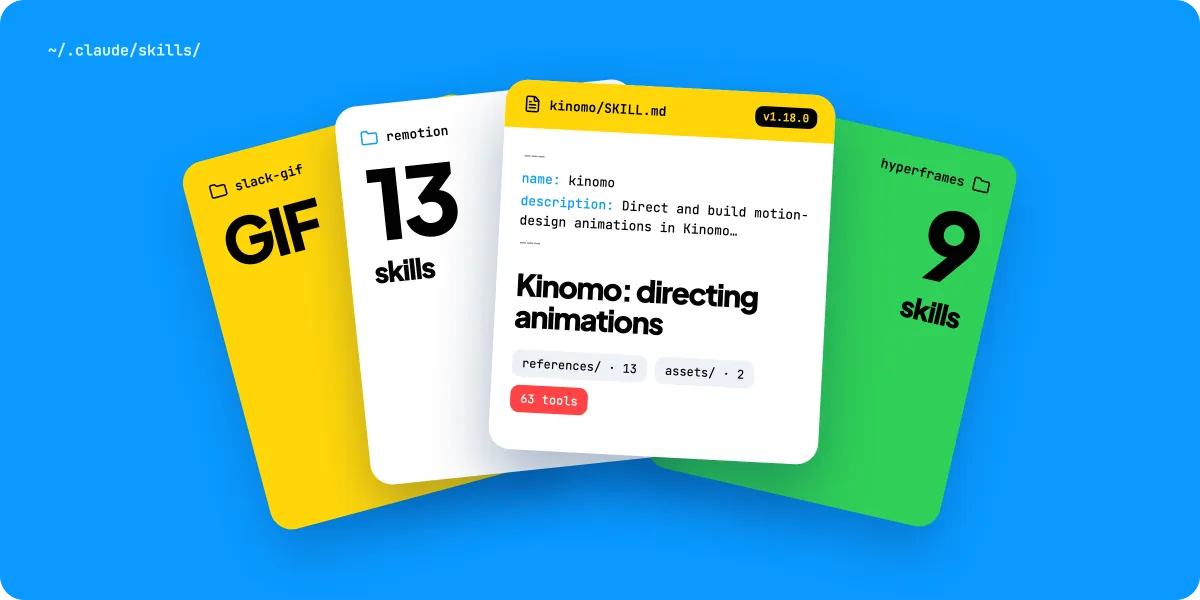
HyperFrames is an open-source framework that turns HTML, CSS, media and seekable animations into MP4. Its 9 published skills teach Claude the whole loop (plan, write the HTML, animate, lint, preview, render), with a registry of about 450 ready-made blocks.
claude plugin marketplace add heygen-com/hyperframes
claude plugin install hyperframes@hyperframes- For: people comfortable with HTML and a terminal who want an open pipeline.
- Limit: needs Node.js 22+ and FFmpeg; two skills (
/reverse-any-video,/style-sampling) are marked HyperFrames Pro. - License: Apache 2.0 · ~86k GitHub stars (Nov 2026) ·
hyperframesskill: ~1.6M installs on skills.sh (Nov 2026).
HyperFrames and Kinomo also work as a pair: how Kinomo and HyperFrames fit together.
2. Kinomo skill
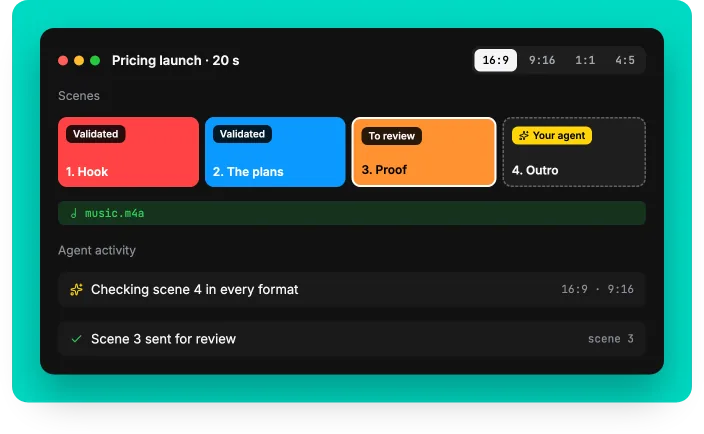
Kinomo is a native Mac app for motion design, and its skill (version 1.18.0 with Kinomo 0.8) teaches Claude to direct and build animations in it through 63 MCP tools. What sets it apart is where the work happens:
- You watch every change live. In the skill's words, Claude writes "a document the human watches live in the app". You can drag an animation block or swap a word yourself at any point.
- One scene, every format. A scene holds its 16:9, 9:16, 1:1 and 4:5 versions on one timeline, and the skill tells Claude to design them together rather than adapt the landscape cut at the end.
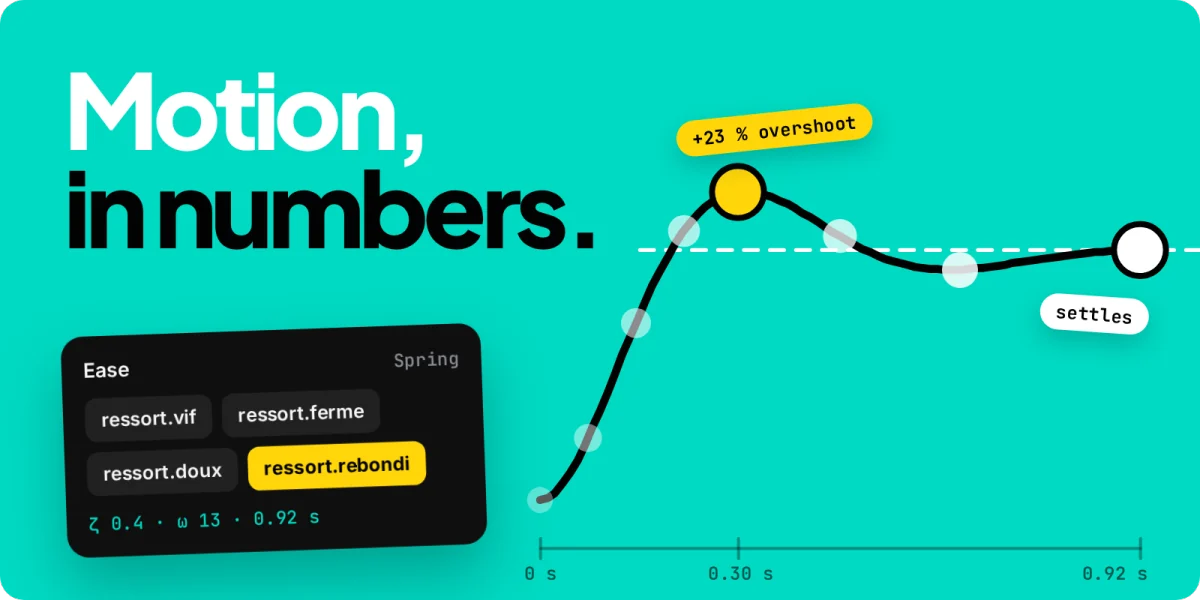
- Motion that feels physical. Kinomo 0.8 added springs that keep their feel whatever their duration, a tempo grid so cuts land on the beat of your music, and seams written on both sides of a cut.
- Checks before you review. The agent runs
lint_sceneandlint_filmon every format (overflowing bounces, cascades that tick like a metronome, elements that appear from nowhere) and hands each scene back "to review". - One undo. A batch of changes from your agent is undone in a single step.
- Direction first. The skill asks for your intent in one message, proposes three concepts and a scene plan, and waits for your approval before building.
- Install: in Kinomo, Help › Connect an Agent… › Install the skill (copies it to
~/.claude/skills/kinomo). - Limit: macOS 15 or later on Apple silicon only.
- Price: Free plan. Paid plans from $50/year. The skill ships inside the app, so it has no public star or install count.
More on the app itself: AI motion graphics you can edit with Kinomo.
3. Remotion Agent Skills
Remotion makes "videos programmatically with React". Its team maintains 13 skills, from /remotion-best-practices (an umbrella skill) to /remotion-render, /remotion-captions and /remotion-maps (Remotion Docs).
npx remotion skills add- For: developers who write React and want video rendered from code, data or templates.
- Limit: Remotion is free for individuals, companies of up to 3 employees and non-profits; larger companies need a Company License (Remotion License).
- License: no license file on the skills repository · ~7.5k stars (Nov 2026) ·
remotion-best-practices: ~854k installs on skills.sh (Nov 2026).
Remotion can feed Kinomo too: how Kinomo and Remotion fit together. If you're choosing between the two code routes, Remotion vs HyperFrames sets them side by side.
4. GSAP AI Skills (GreenSock)
The official GSAP skills teach agents the GreenSock animation library: core tweens, timelines, ScrollTrigger, plugins and React, Vue or Svelte usage. GSAP itself is free, plugins included.
npx skills add https://github.com/greensock/gsap-skills- For: web animation, and HTML video engines that accept GSAP (HyperFrames lists it among its adapters).
- Limit: it teaches an animation library; it doesn't render a video file by itself.
- License: MIT · ~19k stars (Nov 2026) ·
gsap-core: ~92k installs on skills.sh (Nov 2026).
Edit real footage
5. video-use (Browser Use)
video-use edits a folder of raw takes into final.mp4: it cuts filler words and dead space, grades colour, burns subtitles and adds animation overlays, then checks every cut before showing you. It proposes a strategy and waits for your OK first.
git clone https://github.com/browser-use/video-use ~/Developer/video-use
ln -sfn ~/Developer/video-use ~/.claude/skills/video-use- For: talking heads, tutorials, interviews and montages shot on camera.
- Limit: needs FFmpeg and an ElevenLabs API key for word-level transcription.
- License: MIT · ~31k stars (Nov 2026).
6. ffmpeg-skill
ffmpeg-skill gives Claude Code, Cursor or Codex 42 FFmpeg tools with a machine-readable contract and an MCP server: cut, join, captions, reframe, loudness and platform exports, all local, with the result probed after each step.
npx ffmpeg-skill- For: precise, offline operations on files you'd rather not upload. Before an export, check which codec to choose: H.264, HEVC or ProRes.
- Limit: needs FFmpeg and Python 3 on your PATH; by its own README it does the cutting and measuring, not the deciding what to cut.
- License: MIT · ~7.9k stars (Nov 2026) · ~1.8k installs on skills.sh (Nov 2026).
Learn motion craft
7. motion-design-skill (LottieFiles)
motion-design-skill teaches motion principles independent of any engine: timing and easing tables, choreography, Disney's 12 principles adapted for UI, emotion-to-motion mapping. The same rules, with numbers an agent can apply, are explained in motion design principles for AI agents.
npx skills add LottieFiles/motion-design-skill- For: UI animation and any project where the motion feels mechanical.
- Limit: principles only; for MP4, GIF or Lottie files the README points to LottieFiles' Creator MCP.
- License: MIT · ~3.3k stars (Nov 2026) · ~27k installs on skills.sh (Nov 2026).
8. claude-motion
claude-motion is a toolkit on top of Remotion: motion rules with numbers, a self-review loop on contact sheets, a Python sound engine, and a second pipeline that turns web simulations into 60 fps video.
git clone https://github.com/whaleyxbt/claude-motion && cd claude-motion
npm install && npm run build- For: people already using Remotion who want taste and sound on top of the API. (Not related to Anthropic's Claude Motion feature.)
- Limit: Node 20+, Python 3 and FFmpeg; Remotion's license applies.
- License: MIT · ~1k stars (Nov 2026).
Make a product launch video
9. video-shotcraft
video-shotcraft captures your real product pages, picks shots from a library of 124 recipe cards, animates them in Remotion, syncs to the beat and adds sound design. The film stays editable in a browser workbench. For the method behind any launch film, from the brief to the export, read how to make a product launch video with Claude.
npx skills add Vincentwei1021/video-shotcraft- For: SaaS promos built from your own screens.
- Limit: tuned for Claude Code and Codex; Remotion's license applies.
- License: Apache 2.0 · ~21k stars (Nov 2026) · ~9.6k installs on skills.sh (Nov 2026).
10. product-launch-motion
product-launch-motion turns a website URL into a 60 fps launch film in plain HTML: one shape that morphs instead of cutting, springs, a cursor that drives every change and sound effects on the beat. It logs each creative call as a DECISION: line you can overturn.
npx skills add AbubakrChan/product-launch-motion- For: a single, strong launch film in a defined style.
- Limit: one house style; its README recommends a specific Claude model for v2 results.
- License: MIT · ~490 stars (Nov 2026) · ~1.1k installs on skills.sh (Nov 2026).
Also worth knowing
- claude-motion-design (MIT, ~850 stars, Nov 2026): launch videos in HTML, Playwright and FFmpeg, with beat-placed sound effects.
- manim-skill (MIT, ~210 stars, Nov 2026): 3Blue1Brown-style explainers in Manim with local voiceover; needs LaTeX.
- OpenMontage (AGPL-3.0, ~81k stars, Nov 2026): a full agentic production system rather than a single skill, with research, script, assets and composition pipelines.
- Slack GIF Creator (Anthropic, Apache 2.0): animated GIFs for Slack, built frame by frame in Python.
- Claude Motion is a built-in beta feature on Team and Enterprise plans that exports short animations as MP4 (Claude Help Center); it isn't a skill you install.
Comparison: what each skill produces and needs
| # | Skill | Job | Output | Needs | License / price |
|---|---|---|---|---|---|
| 1 | HyperFrames | Create motion | MP4 from HTML | Node 22+, FFmpeg | Apache 2.0; 2 Pro skills |
| 2 | Kinomo | Create motion | Editable project, every format | macOS 15+, Apple silicon | Free plan. Paid plans from $50/year. |
| 3 | Remotion | Create motion | MP4 from React | Node, a Remotion project | Free up to 3 employees; Company License above |
| 4 | GSAP AI Skills | Motion craft | GSAP code | A GSAP project | MIT |
| 5 | video-use | Edit footage | final.mp4 from rushes | FFmpeg, ElevenLabs key | MIT |
| 6 | ffmpeg-skill | Edit footage | Edited files | FFmpeg, Python 3 | MIT |
| 7 | motion-design-skill | Motion craft | Better motion, any engine | Nothing | MIT |
| 8 | claude-motion | Motion craft | MP4 via Remotion | Node 20+, Python, FFmpeg | MIT (+ Remotion license) |
| 9 | video-shotcraft | Launch video | MP4 via Remotion | Node, FFmpeg | Apache 2.0 (+ Remotion license) |
| 10 | product-launch-motion | Launch video | 60 fps MP4 | Playwright, FFmpeg | MIT |
When to choose Kinomo, and when not to
Choose Kinomo when you want to see and touch the animation while Claude builds it: approve the direction, watch each scene appear, fix a word or a timing by hand, and export 16:9, 9:16, 1:1 and 4:5 from the same timeline. It suits founders, designers and marketers who'd rather direct than read code.
Choose another skill when:
- your video lives in a repository and goes through code review: Remotion or HyperFrames;
- you're on Windows or Linux: HyperFrames, whose Studio app is offered for Mac, Windows and Linux;
- you're editing footage you shot: video-use or ffmpeg-skill;
- you animate a website or app UI: GSAP AI Skills and motion-design-skill.
Step by step: the Kinomo skill with Claude Code
- Install Kinomo. Download Kinomo for Mac and open it.
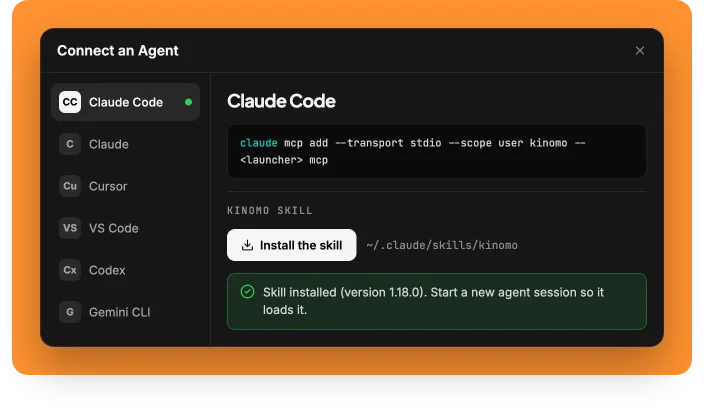
- Open Help › Connect an Agent… and pick Claude Code. If the
claudecommand is found, the button registers the server; otherwise the sheet gives you the command to copy:
claude mcp add --transport stdio --scope user kinomo -- <launcher> mcp- Click Install the skill and confirm. Kinomo copies it to
~/.claude/skills/kinomo; a folder with that name that isn't the Kinomo skill is never touched. - Start a new Claude Code session so it loads the skill, and check the connection with
claude mcp list. - Describe the animation, for example: "A 20-second launch animation for our pricing page, 16:9 and 9:16, music only." Claude asks what it can't infer in one message, then proposes three concepts and a scene plan.
- Approve the direction. Following the skill, Claude doesn't build anything before you approve. It then builds scene by scene and hands each one back "to review".
- Review and export. Leave comments in Kinomo, let Claude fix them, then export each enabled format.
When a new version of the skill ships with the app, the same sheet shows Update with both version numbers. What changed in each version is in the changelog.
Limits worth knowing
- A skill doesn't render. Without its engine (Node and FFmpeg, a Remotion project, the Kinomo app) it has nothing to drive.
- Matching isn't guaranteed. Claude picks a skill by its description. If it doesn't load, name it (
/kinomo,/hyperframes). - Surfaces are separate. A skill installed in Claude Code isn't on claude.ai, and the reverse is true too.
- Licenses stack. A skill under MIT that renders with Remotion still falls under Remotion's license.
- Popularity isn't quality. Stars and install counts show reach, not results on your project.
- No footage. None of these skills films people or places; that still needs a camera or a video generator.
Frequently asked questions
What are Claude skills?
Folders of instructions, each with a SKILL.md file, that Claude loads when your request matches their description. They can include reference files, templates and scripts, and work in Claude Code, the Claude apps and the API, each installed separately.
Is there a Claude skill for video?
Yes, several. HyperFrames, Remotion, claude-motion and video-shotcraft make Claude write videos as code; Kinomo makes Claude build animations in a Mac app you watch live; video-use and ffmpeg-skill edit footage you already have.
How do I install a skill in Claude Code?
Run the command from the skill's README (often npx skills add <owner>/<repo> or a plugin), or put the skill folder in ~/.claude/skills/ yourself. Start a new session so Claude sees it.
Can Claude make animations?
Yes. With a skill and an engine, Claude writes animated scenes, titles, interfaces and charts, then renders or exports them. It builds the animation; it doesn't generate pixels.
Are Claude skills free?
Every skill in this list is free to install except two HyperFrames skills that need HyperFrames Pro. Engines can cost money: Remotion needs a Company License above 3 employees, and Kinomo: Free plan. Paid plans from $50/year.
Which Claude skill is best for Instagram Reels or TikTok?
Any of the motion skills can produce 9:16 (exact sizes per network are in Social media video sizes 2026). Choose Kinomo if you want the vertical and landscape versions designed together on one timeline, and HyperFrames or Remotion if you'd rather define a vertical composition in code. For a reel cut from camera footage, use video-use.
Sources · checked on Nov 18, 2026
- Claude Docs, "Agent Skills" overview · platform.claude.com/docs/en/agents-and-tools/agent-skills/overview
- Claude Code Docs, "Skills" · code.claude.com/docs/en/skills
- Claude Help Center, "Using skills in Claude" · support.claude.com/en/articles/12512180
- Claude Help Center, "Get started with Claude Motion" · support.claude.com/en/articles/17454997
- HyperFrames · github.com/heygen-com/hyperframes · skills.sh/heygen-com/hyperframes
- Remotion Agent Skills · remotion.dev/docs/ai/skills · github.com/remotion-dev/skills · skills.sh/remotion-dev/skills
- Remotion License · github.com/remotion-dev/remotion/blob/main/LICENSE.md
- GSAP AI Skills · github.com/greensock/gsap-skills · skills.sh/greensock/gsap-skills
- video-use · github.com/browser-use/video-use
- ffmpeg-skill · github.com/kajisho5/ffmpeg-skill · skills.sh/kajisho5/ffmpeg-skill
- motion-design-skill · github.com/LottieFiles/motion-design-skill · skills.sh/LottieFiles/motion-design-skill
- claude-motion · github.com/whaleyxbt/claude-motion
- video-shotcraft · github.com/Vincentwei1021/video-shotcraft · skills.sh/Vincentwei1021/video-shotcraft
- product-launch-motion · github.com/AbubakrChan/product-launch-motion · skills.sh/AbubakrChan/product-launch-motion
- claude-motion-design · github.com/howseen-ai/claude-motion-design
- manim-skill · github.com/Yusuke710/manim-skill
- OpenMontage · github.com/OpenMontageInc/OpenMontage
- Anthropic skills repository · github.com/anthropics/skills
- Kinomo · kinomo.app
Retrieved 2026-11-18. Stars and installs rounded, as displayed that day.