Motion design principles for AI agents: easing, timing and choreography (2026)
Agents can write animation code but can't watch it. Here are the rules, in numbers, that an agent can apply and you can check.

Zouhair Majzoub · Founder
AI agents can write animation code, but they can't watch what they wrote, so they fall back on the same half-second ease on everything, all at once. The fix is to hand them motion design principles as numbers: a curve for each role, a duration for each size, one lead move per shot, and a review loop on rendered frames.
This guide is for people who make videos with Claude Code or Codex, and for motion designers curious about what agents can and can't do. Every number below comes from a published guideline or is marked as a workshop rule, so your agent can apply it and you can check it.
Why AI agents need motion rules written as numbers
A language model never sees motion. It writes values (a start, a duration, a curve) and can look at still frames if you render them, but it can't feel that a card arrived late. Without rules, it takes the library's default, which is fine for one element and wrong for a scene. GSAP's core skill documents a default duration of 0.5 s with a power1.out ease. Remotion's spring() defaults to a mass of 1, damping of 10 and stiffness of 100, which works out to a damping ratio of 0.5: a visible bounce on everything unless you change it. HyperFrames' own motion reference calls the same power2.out at 0.5 s on everything "the flat default that makes a film feel generated".
The result has five symptoms: everything starts on frame 0; every element shares one curve, so nothing has weight; bounce on text and fades; durations at random; and no element leads, so the eye doesn't know where to go.
The 12 principles of animation, as parameters
Frank Thomas and Ollie Johnston set out Disney's 12 principles of animation in The Illusion of Life (1981). Most of them translate directly into values an agent can write:
| Principle | What the agent sets |
|---|---|
| Timing | The duration of each block, by size and distance |
| Slow in and slow out | The ease: decelerate into a pose, accelerate out of one |
| Arcs | A curved path for travel instead of two straight x and y moves |
| Anticipation | A small pull back before the hero move only |
| Follow-through and overlapping action | Overlap: the next element starts while the previous one is 30–50 % done |
| Staging | One lead per shot; everything else supports or stays still |
| Secondary action | Accents anchored to the lead's start, impact or rest |
| Exaggeration | Overshoot, set by the spring's damping ratio |
| Squash and stretch | Scale on characters and mascots, never on interface or text |
A naming trap: in classical animation "ease in" means slowing into a pose, while CSS calls the same curve ease-out. Give your agent roles ("arrival", "exit") rather than these words, and the confusion disappears.
Easing: pick the curve by role
Easing is how speed changes over a move. The rule that covers most cases is to choose it by what the element is doing:
| Role | Curve | Example values |
|---|---|---|
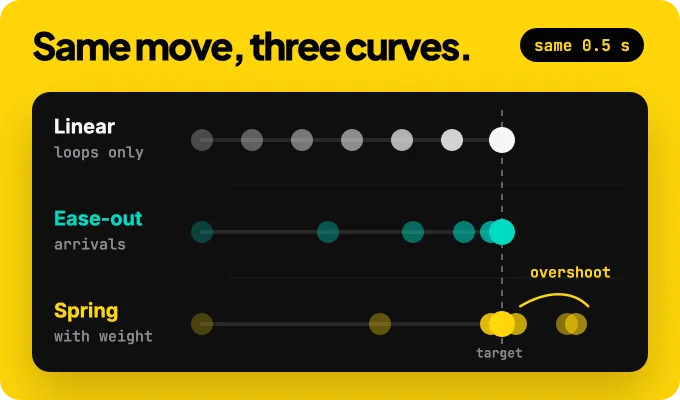
| Arrival (enters the frame) | Decelerate: ease-out or a spring | Material "standard decelerate" cubic-bezier(0, 0, 0, 1) |
| Exit (leaves the frame) | Accelerate: ease-in, shorter | Material "standard accelerate" cubic-bezier(0.3, 0, 1, 1) |
| Move on screen (starts and ends visible) | Ease both ways | Material "standard" cubic-bezier(0.2, 0, 0, 1) |
| Fade, colour change | Ease both ways, never a bounce | Material effects springs are critically damped |
| Constant motion (progress bar, scroll, rotation) | Linear | cubic-bezier(0, 0, 1, 1) |
One nuance between interfaces and video. Emil Kowalski recommends ease-out for elements entering or exiting an interface, because ease-out starts fast and the interface feels responsive to someone waiting on it. In a video nobody is waiting on the exit, so an accelerating, shorter exit reads as "leaving" and keeps the focus on what comes next.
Springs instead of Bézier for anything with weight
A spring describes motion with physics instead of a fixed curve. Two values matter:
- Damping ratio (ζ, or "bounce" in some APIs) sets the overshoot. At 1 there is none (critically damped); below 1 the element passes its target and settles back.
- Stiffness sets the speed. A stiffer spring arrives faster.
The major design systems already work this way. Material's Android motion system ships six spring tokens: spatial springs at a damping ratio of 0.9 for position and size, effects springs at 1 (no bounce) for colour and opacity, each in three speeds with stiffness 1400 (fast, small components), 700 (default) and 300 (slow, full screen). Apple's SwiftUI names its presets by feel: .smooth has no bounce, .snappy a small amount, .bouncy a higher amount.
Two rules follow. Bounce belongs to position and scale, never to opacity or colour. And bounce is a brand choice: HyperFrames' reference reads a damping ratio of 0.4–0.6 as playful, 0.7–0.85 as premium, and 1 as no bounce at all.
A closed vocabulary of named springs
Agents choose better from a short menu than from infinite numbers. Give yours four named feels and forbid anything else unless asked. Here is the set Kinomo's skill uses, as an example of the shape (workshop values, validated on launch pieces, not a standard):
| Kinomo name | Damping ratio ; stiffness (rad/s) | For | Settles in |
|---|---|---|---|
ressort.vif (lively) | 0.7 ; 20 | Pills, buttons, the cursor | 0.35 s |
ressort.ferme (firm) | 0.85 ; 14 | Cards, panels, short camera moves | 0.49 s |
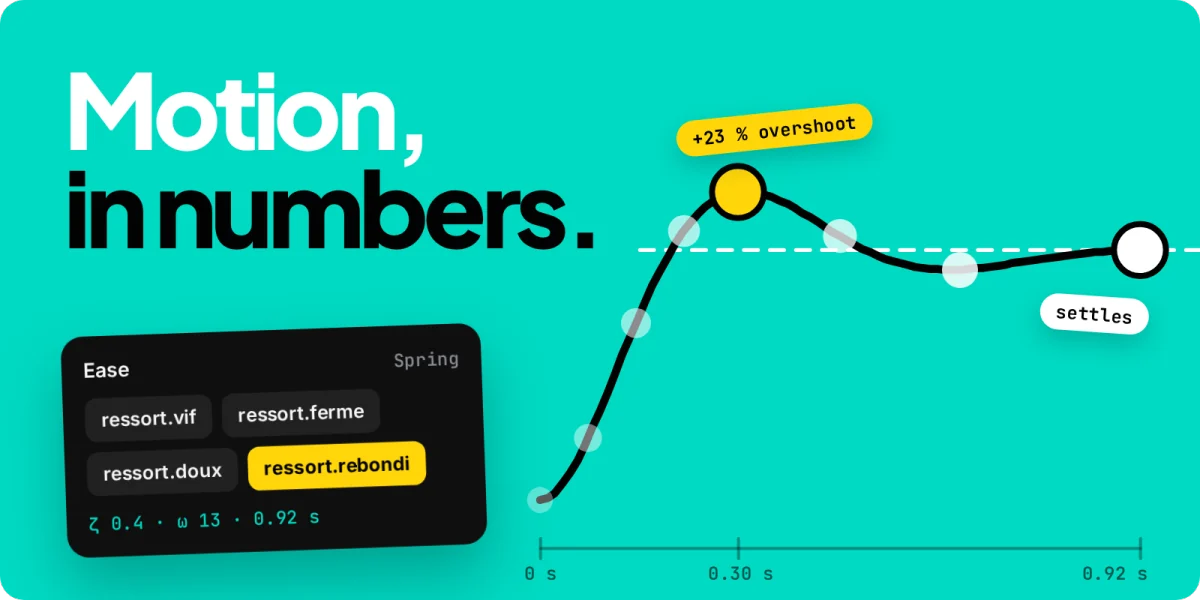
ressort.doux (soft) | 1 ; 9 | Titles, large elements, slow camera | 0.83 s |
ressort.rebondi (bouncy) | 0.4 ; 13 | Characters, mascots, the one playful beat | 0.92 s |
Timing: duration follows size and distance
Duration is where agents guess most. These are the published orders of magnitude for interfaces:
| What moves | Duration | Source |
|---|---|---|
| Simple feedback (checkbox, toggle) | about 100 ms | Nielsen Norman Group |
| Most interface animations | 100–400 ms, up to 500 ms | Nielsen Norman Group |
| A modal or a large change on screen | 200–300 ms; 400 ms for big moves across large screens | Nielsen Norman Group |
| UI animations in general | under 300 ms | Emil Kowalski |
| Material's duration scale | 16 steps from 50 ms to 1,000 ms | Material Design (Android) |
In a video the viewer watches instead of waiting, so large moves can take longer. A workshop rule for motion graphics: small UI 0.2–0.3 s, cards 0.4–0.5 s, titles, camera and logo 0.6–0.9 s, up to about 1 s.
Three principles hold in both worlds:
- Bigger and further means longer. NN/g reserves its longest durations for big movements across large screens, and Material uses its slow spring for full-screen motion.
- Exits are shorter than entrances. NN/g gives a popup that takes 300 ms to appear and 200–250 ms to leave. In video, 40–60 % of the entrance works well (workshop rule).
- Don't start at zero. Begin the first move 0.1–0.3 s into a shot (workshop rule), so the cut and the motion don't collide.
Reading holds
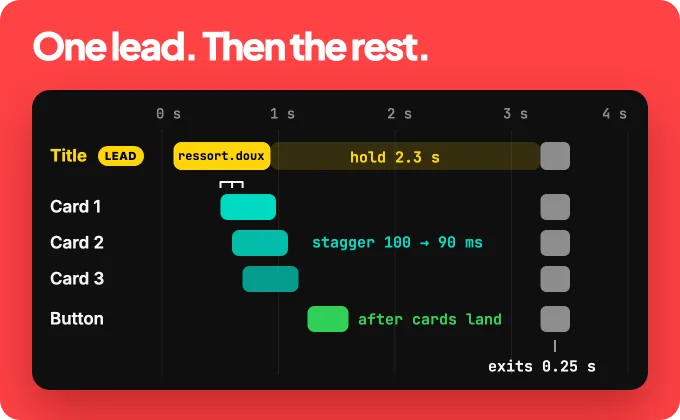
Viewers need time to read text once it has stopped moving. The BBC's subtitle guidelines recommend 160–180 words per minute, which is 0.33 to 0.375 s per word, and a minimum of around 0.3 s per word on screen (1.2 s for four words). For on-screen titles, a common workshop rule adds a moment to find the text: 0.5 s plus 0.3 s per word, counted from the moment the text is still. A six-word line then holds 2.3 s, and the last line of a piece holds 2–3 s. Titles that animate word by word need the same holds; kinetic typography covers readability in motion in more depth.
Timing to music
Music gives you a grid for free. Frames per beat = fps × 60 ÷ BPM, and you compute each beat from its index rather than adding rounded durations, or the cuts drift. At 120 BPM a beat lasts 0.5 s and a bar of four beats 2 s.
- Cut on bars, not on every beat. Cutting on every beat is texture, not story.
- Change sections on phrase boundaries, typically every four or eight bars, never in the middle of a musical phrase.
- Land the peak on the drop. A move that must hit a beat starts early by its own rise time, so its impact falls on the beat.
Choreography: one thing leads
Choreography is deciding who moves, in which order, and who stays still. Cast every layer before choosing a single duration:
| Role | How many | What it does |
|---|---|---|
| Lead | one per shot | The hero move: the longest travel, the moment the eye follows |
| Support | a few | Travels 50–70 % as far, starts 0.1–0.2 s after the lead, lands before it settles |
| Decor | any | Fades or shifts in place, no travel, no overshoot |
| Still | most of the frame | Doesn't move. Stillness is what makes the lead readable |
If you can't name the lead, the shot has two ideas: split it.
Stagger in reading order
A stagger offsets identical entrances so they read as one gesture. Recommended gaps sit in a narrow band: HyperFrames' reference gives list items 40–80 ms and words 60–120 ms, Kinomo's skill starts cards at 0.10 s, and letters are one frame apart. Keep the whole cascade short: the LottieFiles motion skill sets a 500 ms ceiling on total stagger, and a workshop rule caps it at about 0.5–0.7 s and staggers only the first five or six items. Go in reading order (title, then supporting line, then details) and let the gaps tighten slightly as the wave goes (0.10, 0.09, 0.08 s), so it doesn't tick like a metronome.
Continuity over slides
- One entrance per container. When a panel slides in, its content travels inside it. Don't also cascade its rows during the same move.
- Exits go back the way they came. What rose from below leaves downward; only the timing changes.
- Elements persist and transform. A button becomes a panel, a card grows into the next scene, and the camera travels across one canvas instead of cutting between slides.
- A suggested ceiling: no more than three things in motion at the same instant (a workshop rule). Everything else waits or stays still.
Before and after: the same scene
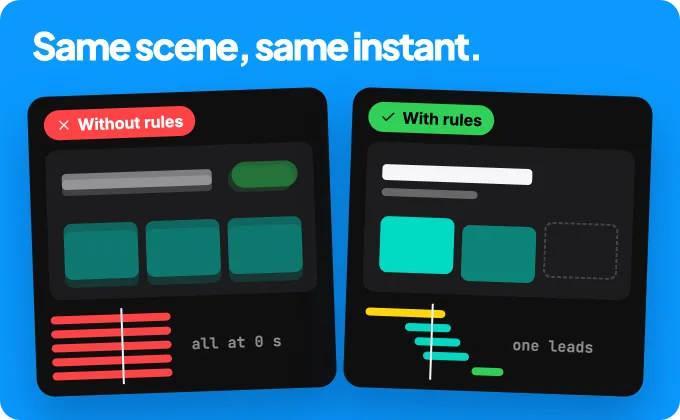
Take one 6-second scene: a title, three cards and a button. Here is what an agent writes with no rules, and what it writes with the rules above.
| Without rules | With rules | |
|---|---|---|
| Curves | power2.out 0.5 s on every element | Title on ressort.doux 0.8 s, cards on ressort.ferme 0.48 s, button on ressort.vif 0.3 s |
| Order | All at 0 s | Title at 0.1 s, cards 100/90/80 ms apart, then the button |
| Bounce | On the title text and the fades | Only on the cards' position, none on text or opacity |
| Hold | Title moves until the cut | Text still for 2.3 s |
| Exit | Same 0.5 s, upward | 0.25 s ease-in, downward, the way the cards came |
Make the rules usable by an agent
Rules only change an agent's output when they are in its context. Four pieces turn them into habits.
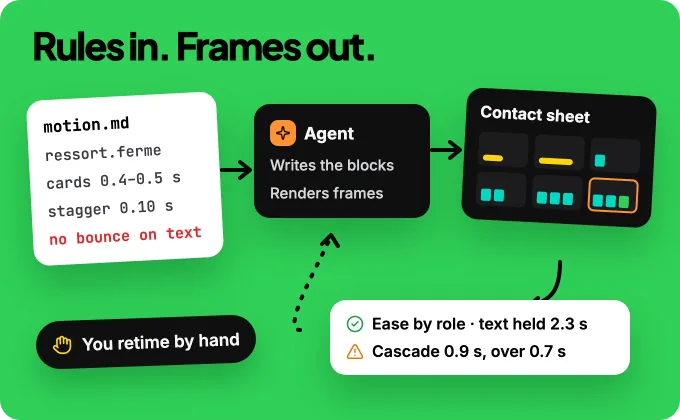
1. A taste file. Put your numbers in a skill or a short Markdown file the agent reads before animating: named springs, durations by size, stagger, holds, and a banned list.
- Arrivals: firm spring, ζ 0.85. Titles: ζ 1, no bounce. Small UI: ζ 0.7.
- Exits: ease-in, 50 % of the entrance, back the way they came.
- Fades and colour: ease-in-out, never a spring. Linear only for loops.
- Durations: UI 0.2–0.3 s, cards 0.4–0.5 s, titles and camera 0.6–0.9 s.
- Stagger: 0.10 s, tightening; max 6 items; total under 0.7 s.
- Hold text 0.5 s + 0.3 s per word once still. Last line 2–3 s.
- One lead per shot. No more than 3 elements moving at once.
- Banned: bounce on text, scale from 0, symmetric in/out, everything at frame 0.
2. Named recipes. A "card cascade", a "click", a "giant title", written once with good values. The agent picks one and retunes it instead of improvising.
3. A review loop. The agent renders a contact sheet (one frame at each block's start and end), checks it against the rules, and fixes what fails. When a move looks wrong, it tries fixes in this order and stops at the first that works: remove it, reduce it, fix the curve, fix the origin, then polish.
4. A human with the last word. Checks prove structure, not taste. Keep a way to retime a block by hand when the numbers are right and the feeling isn't.
Skills that already teach motion
You don't have to write the taste file from zero. These are public and current:
| Skill | What it gives your agent |
|---|---|
| LottieFiles motion-design-skill | Library-agnostic timing and easing tables, Disney's principles for UI, stagger budgets |
| claude-motion (whaleyxbt) | Remotion toolkit: motion rules in numbers, self-review on contact sheets, sound |
| GSAP skills (GreenSock) | Official: correct eases, staggers, timelines, ScrollTrigger |
| Remotion skills | Official skills for Remotion: best practices, creating a project, captions, rendering |
| HyperFrames | Motion reference measured on its launch films: ease by role, springs, stagger, holds |
| Emil Kowalski's skills | UI animation taste: curves, durations, strict reviews |
For a wider comparison, read the best Claude skills for video.
Where Kinomo fits
Kinomo is the Mac app we build for AI motion graphics you can edit: your agent animates over MCP while you watch. It applies the rules in this guide natively, so your agent doesn't start from defaults:
- Named springs. Four physical springs,
ressort.vif,ressort.ferme,ressort.douxandressort.rebondi(lively, firm, soft, bouncy), keep the same feel at any duration and give each move its natural duration, plus reference springs for small UI, cards, characters and camera. - Recipes as tools.
apply_recipewrites ten common moves with good values: card cascades with a lead and tightening gaps, clicks, panels, giant titles, fast exits, menus, rolling counters, paths and more. - Music analysis.
analyze_audiofinds the tempo, beats and bars on your Mac,set_beat_gridlays the bar grid, and key moves anchor to music markers instead of hard-coded seconds. - Checks that see motion.
lint_sceneandlint_filmflag symmetric in/out rhythms, uniform or overlong cascades, bouncy interface, overshoot that leaves the frame, moments where everything moves, and text held too briefly.render_stripand onion-skin frames let the agent look before it says it's done. - Your hands on the timeline. Drag an animation block to retime it, take over at any moment, and undo a whole batch of agent changes with one ⌘Z.
Kinomo runs on macOS 15 or later with Apple silicon. Free plan. Paid plans from $50/year.
Limits worth knowing
- Rules aren't taste. They remove the worst defaults; a weak idea with perfect easing is still weak.
- Numbers are starting points. Brand, music and format change them; a 9:16 frame, for example, needs larger text and its own safe zones (social media video sizes). Change a value on purpose and say why.
- Agents still can't watch. Frames and checks catch collisions, timing and overshoot, not feel. Plan a human pass.
Frequently asked questions
What are the principles of motion design?
Easing by role, timing by size and distance, one lead move, staggering in reading order, continuity and restraint. Most come from Disney's 12 principles of animation, translated into durations, curves and offsets.
What are the 12 principles of animation?
Squash and stretch, anticipation, staging, straight-ahead and pose-to-pose action, follow-through and overlapping action, slow in and slow out, arcs, secondary action, timing, exaggeration, solid drawing, and appeal. Frank Thomas and Ollie Johnston described them in The Illusion of Life (1981).
What does ease in and ease out mean?
In CSS, ease-out starts fast and slows down at the end (good for arrivals), and ease-in starts slow and speeds up (good for exits). Classical animation uses the words the other way round, so name curves by role to avoid mistakes.
How long should a UI animation be?
Most interface animations should take 100–400 ms: about 100 ms for a toggle, 200–300 ms for a modal, up to 400 ms for big moves across large screens, according to Nielsen Norman Group.
What is timing in animation?
How long a move lasts and when it starts relative to others. It gives objects weight: small things move fast, large things slower.
Can AI agents do motion design?
They can build it, not judge it. Give an agent explicit rules, named springs and recipes, have it check rendered frames against them, and keep a human for the final call on feel.
Conclusion
Good motion is a set of decisions an agent can follow: the curve for the role, the duration for the size, one lead, a short stagger, a real hold, a quick exit. Write them as numbers, let your agent look at its frames, and keep your hand on the timeline.
To try it in practice, read How to make a product launch video with Claude or Can Claude make videos?, then download Kinomo for Mac. Free plan. Paid plans from $50/year.
Sources · checked on Nov 18, 2026
- Nielsen Norman Group, "Executing UX Animations: Duration and Motion Characteristics" (Page Laubheimer, 2020) · nngroup.com/articles/animation-duration
- Material Components for Android, "Motion" (spring, easing and duration tokens) · github.com/material-components/material-components-android/blob/master/docs/theming/Motion.md
- Apple Human Interface Guidelines, "Motion" · developer.apple.com/design/human-interface-guidelines/motion
- Apple Developer, SwiftUI `Animation.smooth`, `.snappy`, `.bouncy` and `Spring` · developer.apple.com/documentation/swiftui/spring
- Emil Kowalski, "7 practical animation tips" · emilkowal.ski/ui/7-practical-animation-tips
- BBC Subtitle Guidelines, section 4 "Timing" · bbc.co.uk/accessibility/forproducts/guides/subtitles
- Remotion docs, `spring()` · remotion.dev/docs/spring
- Motion docs, spring options · motion.dev/docs/spring
- GSAP skills (gsap-core) · github.com/greensock/gsap-skills
- LottieFiles motion-design-skill · github.com/LottieFiles/motion-design-skill
- claude-motion · github.com/whaleyxbt/claude-motion
- Remotion skills · github.com/remotion-dev/skills
- HyperFrames, motion reference · github.com/heygen-com/hyperframes
- Emil Kowalski's skills · github.com/emilkowalski/skills
- Frank Thomas and Ollie Johnston, *The Illusion of Life: Disney Animation* (Abbeville Press, 1981)
- Kinomo skill, motion, recipes and review references · skills/kinomo in the Kinomo app (Connect an Agent sheet)
- Kinomo 0.8 changelog · kinomo.app/changelog