Social media video sizes 2026: every format in one table
Ratio, pixels, length and file limits for Instagram, TikTok, YouTube, LinkedIn, X and Facebook, read on each platform's official pages, plus how to make one video fit them all.

Zouhair Majzoub · Founder
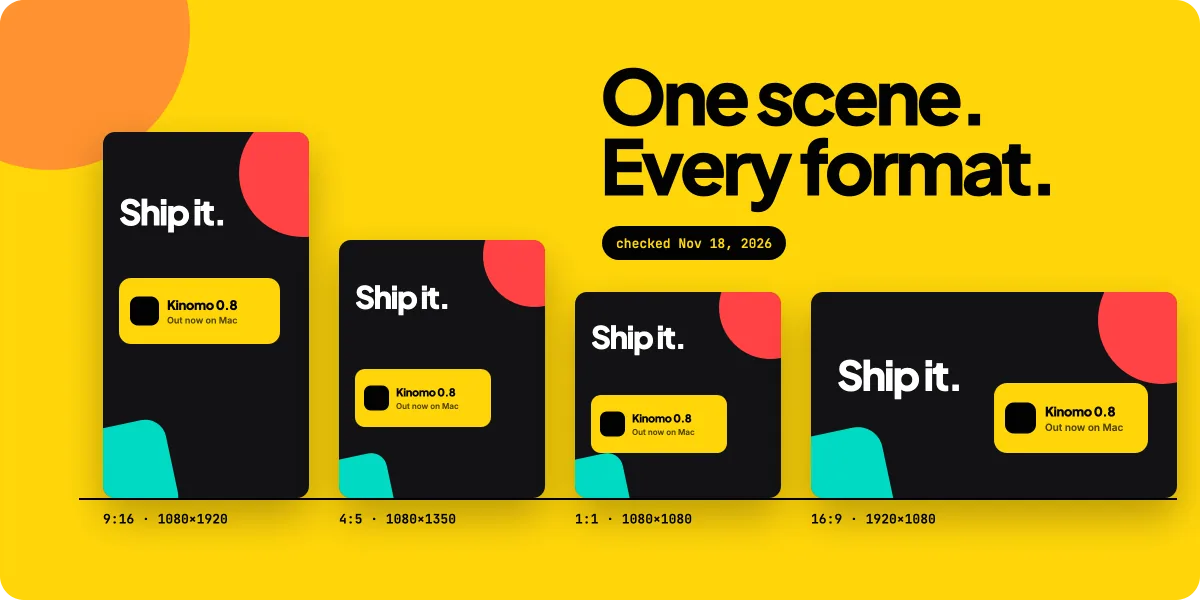
For most social video in 2026, make a vertical 9:16 version, usually exported at 1080×1920, and a landscape 16:9 version at 1920×1080. The vertical one covers Instagram Reels and Stories, TikTok, YouTube Shorts and Facebook Reels; the landscape one covers YouTube and most link posts, and a 4:5 or 1:1 cut covers the remaining feeds. Keep captions and logos out of the top 14% and the bottom 35% of a vertical video, which is where Meta says its interface sits.
Every value below was read on the platform's own help center, ads guide or developer documentation on November 18, 2026. When a platform doesn't publish a number, the table says "not published" instead of borrowing one from a blog. That happens more often than you'd think.
The short answer: which size for which placement
Three shapes cover almost every placement:
- Vertical, 9:16 (usually 1080×1920; TikTok asks for 720×1280 or more): Instagram Reels and Stories, TikTok, YouTube Shorts, Facebook Reels and Stories. It's the format Meta, TikTok's ads team and Google's Shorts ads page recommend.
- Feed, 4:5 or 1:1: LinkedIn's ads guide calls 4:5 its recommended ratio (up to 1080×1350), and Meta's ads guide uses 4:5 at 1440×1800 for Facebook feed videos. For 1:1, 1080×1080 is the common export size.
- Landscape, 16:9 (1920×1080): YouTube, whose help page calls 16:9 "the standard aspect ratio for YouTube on a computer", plus LinkedIn and X posts watched on desktop.
If you only make one version, make the 9:16 one. It plays full screen in every vertical feed, and Instagram Reels, LinkedIn and X posts accept it too. Add a 16:9 version if YouTube or a website matters to you.
Every format, one table (checked Nov 18, 2026)
"Ads" means the value comes from the platform's advertising spec page, and "API" from its developer documentation. Organic limits can differ, and the notes under the table say where they do.
| Placement | Aspect ratio | Pixels | Max length | Max file size · type |
|---|---|---|---|---|
| Instagram Reels | 9:16 recommended; 1.91:1 to 9:16 accepted | 1440×2560 (ads); 720 px minimum | 15 min (API) | 300 MB (API) · MP4, MOV |
| Instagram feed video | Not published (organic); 9:16 (ads) | 1080×1920 (ads) | 60 min (ads) | 4 GB (ads) · MP4, MOV |
| Instagram Stories | 9:16 recommended | 1440×2560 (ads) | 60 s (API) | 100 MB (API) · MP4, MOV |
| TikTok | 9:16 recommended (ads); not published (organic) | 720×1280 or higher | 30 min (web upload) | 10 GB · MP4, WebM |
| YouTube | 16:9 standard | 1920×1080 (list from 426×240 to 7680×4320) | 12 h (15 min unverified) | 256 GB · MP4 recommended |
| YouTube Shorts | Square or vertical | Not published | 3 min | Not published separately |
| 1:2.4 to 2.4:1 | 256×144 to 4096×2304 | 15 min (10 min for Pages) | 5 GB · MP4 and others | |
| X | 1:3 to 3:1 (API) | 1280×720, 720×1280, 720×720 (API) | 140 s; under 4 h with Premium | 512 MB; 16 GB with Premium · MP4 |
| Facebook Reels and video | 9:16 (Reels API) | 1080×1920 (Reels API) | Any length (help center); 90 s (Reels API) | Not published · MP4 recommended |
| Facebook Stories | 9:16 | 1080×1920 (API) | 60 s (API) | Not published (4 GB for ads) · MP4, MOV |
A few notes the table can't hold:
- Instagram. The help center page gives the accepted range (1.91:1 to 9:16), a 720-pixel minimum and 30 fps minimum; its visible text states no maximum length or file size. The 15-minute and 300 MB limits come from Meta's publishing API.
- TikTok. The upload page asks for "720x1280 resolution or higher", MP4 or WebM, up to 30 minutes and under 10 GB. The developer API stops at 10 minutes and 4 GB, and auction In-Feed ads at 10 minutes and 500 MB.
- YouTube. Google lists recommended sizes only for 16:9. Vertical and square videos play in a player that adapts, and Google advises against adding black bars. A video becomes a Short when it's square or vertical and up to three minutes long.
- LinkedIn. Two official pages disagree on file types: the posting page lists MOV and AVI, while the Pages page says they're no longer supported. Export MP4 and you're safe on both.
- X. The help center's 140 seconds and 512 MB apply without a subscription. The API documentation allows more, so a scheduling tool may accept files the app won't.
- Facebook. Meta's help center says that in June 2025 the Videos tab became the Reels tab and that all videos posted to Facebook are now shared as reels, which "can be any length or orientation". The Reels publishing API is stricter: 9:16, 3 to 90 seconds.
Safe zones: where the interface covers your video
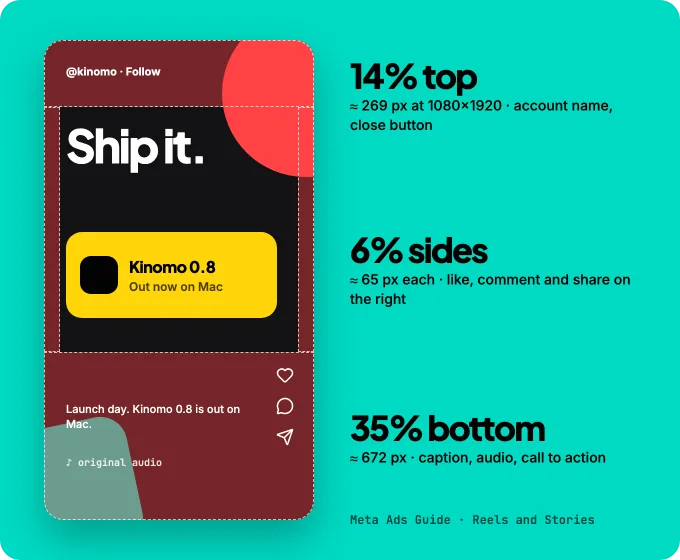
A safe zone is the part of the frame no button, caption or profile name covers. On a 1080×1920 video, Meta's ads guide asks you to keep at least 14% at the top, 35% at the bottom and 6% on each side free of text and logos, for Reels and Stories on both Instagram and Facebook. In pixels:
- Top: about 269 px (account name, close button).
- Bottom: about 672 px (caption, audio, call to action).
- Sides: about 65 px each, with the like, comment and share buttons on the right.
The other platforms don't publish numbers. TikTok's ads help offers downloadable safe-zone templates and notes that "the longer the caption, the smaller the safe zone will be". YouTube Studio shows animated white lines over the "non-safe" area while you edit a Short, without giving measurements. We found no published safe zone for LinkedIn or X.
In practice, Meta's numbers make a sound default for every vertical feed. Put the title in the upper third just below the top band, keep the subject in the middle, and let only pictures and backgrounds run under the bottom band. Animated titles follow the same zones; our guide to kinetic typography that stays readable covers size and pacing. A safe zone isn't an empty band. The picture should still fill it, as long as nothing there needs to be read or clicked.
One video, every format: re-lay it out, don't crop it
Most guides stop at the numbers. The harder part is making the same video work in all of them.
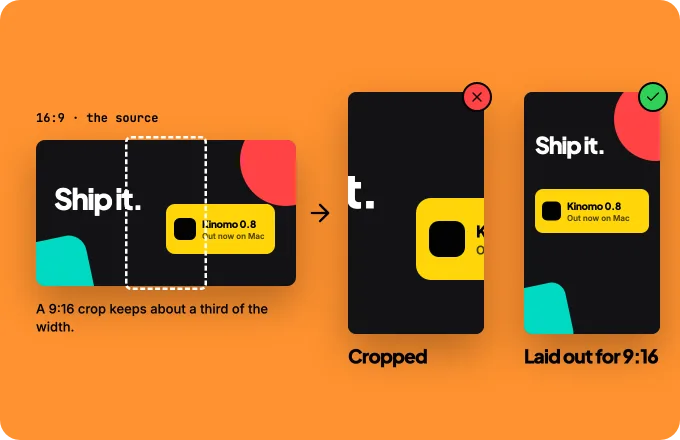
The quick route is to crop. A 16:9 frame cropped to 9:16 keeps about a third of its width (1080 / 1920 × 1080 / 1920 ≈ 32%). Anything near the edges disappears: half a title, the logo, the second card of a row. Cropping a 9:16 frame to 16:9 has the opposite problem, with a tall composition squashed into a short strip. A screen recording runs into the same wall, since it's captured in one shape; that's why we build product demos as scenes instead of recording them.
The route that holds up is to keep the same scene and the same timing, and lay each format out for its shape:
- 9:16: one subject per screen, stacked top to bottom, larger type set higher, clear of the safe zones.
- 4:5 and 1:1: tight framing, with the subject filling most of the frame. 4:5 has room for one more line below the subject; 1:1 doesn't.
- 16:9: room to breathe sideways, so text and subject can sit side by side.
The beats stay identical. The title lands on the same frame in every version and the cut happens at the same second, so one review covers every format. We apply the same rule to a product launch video made with Claude, and the timing numbers that hold across formats are in motion design principles for AI agents.
Step by step: every format at once with Kinomo and Claude Code
Kinomo is the Mac animation app we build, for AI motion graphics you can still edit. If you're still choosing a tool, our overview of motion graphics software for Mac covers the wider field. Claude Code drives it over MCP while you watch each change. Each scene keeps its 16:9, 9:16, 1:1 and 4:5 versions on one shared timeline, so you don't finish one format and adapt it later. Here's how a multi-format project runs, as the Kinomo documentation describes it.
1. Connect Claude Code. In Kinomo, choose Help › Connect an Agent…, click Add to Claude Code, then Install the skill. The full setup is in Can Claude make videos?.
2. Name the destinations in your brief. Tell Claude where the video will play: "Reels and TikTok first, a 4:5 for the LinkedIn feed, a 16:9 for the site." Following the Kinomo skill, Claude sets the format with the most constraints as the primary one (9:16 for a social-first piece) and turns the others on before it builds the first scene. Kinomo's format list also includes 5:4, 3:2, 4:3 and 21:9, plus custom sizes in pixels.
3. Each format gets its own layout. A format without its own layout shows the primary one cropped to cover. That's fine for a full-bleed picture and wrong for text near the edges. As soon as a scene has an override for a format, Kinomo lays that format out natively at its own size. In the app, an edit can apply to "This format only". The timing is shared, and only layout, framing and camera change.
4. Compare the formats side by side. Claude renders the same instant in every format in one image to check that each is a finished picture, with no empty half in the 9:16 and no subject cut at the edges.
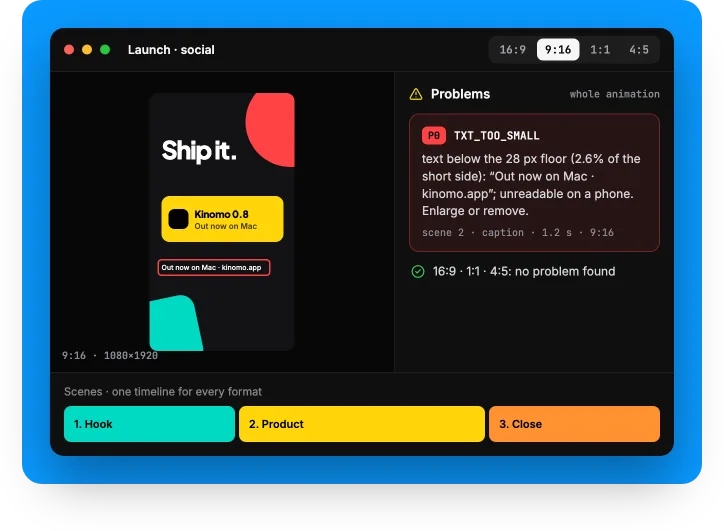
5. Let the check catch small text. Kinomo's scene and animation checks run on every enabled format. Text under 2.6% of the frame's short side, which is 28 px on a 1080-pixel side, is flagged as too small. When a 9:16 format is on and the text falls below 60% of that floor, the warning rises to the highest level and reads "unreadable on a phone". In the Problems panel, a click takes you to the layer, the moment and the format.
6. Export each format. Export from the app, or ask Claude to export a given format as MP4 in H.264 or HEVC (which codec to pick depends on where the file goes). The export runs in the background while you keep working. What changed in each version is in the changelog.
Limits worth knowing
- Specs change without notice. Facebook started sharing every video as a reel in June 2025, and YouTube now allows Shorts of up to three minutes. Check the official pages before a big campaign. The table is dated for that reason.
- Organic and ads specs aren't the same thing. Many numbers quoted online come from ads guides: Meta's 1440×2560, for example. They work for organic posts, but the platforms don't promise it.
- Safe zones are a guide, not a guarantee. Captions grow with their text, and interfaces differ between phones and app versions.
- Re-laying out takes more work than cropping. Every format needs its own decisions about text size, line breaks and framing. Kinomo keeps them in one project, but someone still has to make them.
- Kinomo is Mac only. It needs macOS 15 or later on Apple silicon.
Frequently asked questions
What is the best video size for social media?
9:16, usually exported at 1080×1920, for vertical feeds: Reels, Stories, TikTok, Shorts and Facebook Reels. Use 1920×1080 (16:9) for YouTube, and 4:5 or 1:1 for feed posts on LinkedIn and Facebook.
What is the best aspect ratio for social media?
9:16, if you make only one version. It fills the screen in every vertical feed, and Instagram (1.91:1 to 9:16), LinkedIn (1:2.4 to 2.4:1) and X (1:3 to 3:1) accept it too. YouTube's standard is still 16:9.
What size is an Instagram Reel?
9:16. Meta's ads guide uses 1440×2560, and the help center accepts ratios from 1.91:1 to 9:16 with a 720-pixel minimum. Published through Meta's API, a reel can run up to 15 minutes and 300 MB.
What size is a TikTok video?
TikTok's upload page asks for 720×1280 or higher, MP4 or WebM, up to 30 minutes and under 10 GB. TikTok doesn't publish an aspect ratio for organic posts. Its ads guide recommends 9:16.
How long can a YouTube Short be?
Up to three minutes, and it must be square or vertical. Google doesn't publish a recommended pixel size for Shorts. 1080×1920 is the usual vertical HD frame.
Can I post the same video on every platform?
Yes, if it was made for each shape. One 9:16 file plays almost everywhere, but a landscape video cropped to vertical loses two thirds of its width. Keep the same scenes and timing and give each format its own layout, then check text size and safe zones in each.
Guides by network
This page is the overview. The networks it covers:
- Instagram Reels, feed and Stories video sizes
- TikTok video size and safe zones
- YouTube and YouTube Shorts video sizes
- LinkedIn video size
- X video size
- Facebook Reels and Stories video sizes
Three shapes, two habits
Three shapes cover social video in 2026: 9:16 for anything vertical, 4:5 or 1:1 for feeds, and 16:9 for YouTube and desktop. The numbers matter less than two habits: keep text out of the safe zones, and lay each format out instead of cropping one into another.
Free plan. Paid plans from $50/year. Download Kinomo for Mac, connect Claude Code and ask for your first scene in every format at once.
Sources · checked on Nov 18, 2026
- Instagram Help Center, reel aspect ratio · help.instagram.com/1038071743007909
- Meta for Developers, IG User Media (Reels and Stories publishing) · developers.facebook.com/docs/instagram-platform/instagram-graph-api/reference/ig-user/media
- Meta Ads Guide, Instagram Reels, feed and Stories video · facebook.com/business/ads-guide/update/video/instagram-reels
- Meta Business Help Center, Facebook video and reels specs · facebook.com/business/help/1197310377458196
- Meta for Developers, Reels publishing · developers.facebook.com/docs/video-api/guides/reels-publishing
- Meta for Developers, Page Stories API · developers.facebook.com/docs/page-stories-api
- Meta Ads Guide, Facebook Reels, feed and Stories video · facebook.com/business/ads-guide/update/video/facebook-facebook-reels
- TikTok Support, upload videos from the web · tiktok.com/support/faq_detail?id=7581820704895703564
- TikTok for Developers, Content Posting API · developers.tiktok.com/doc/content-posting-api-media-transfer-guide
- TikTok Ads Help, Auction In-Feed Ads · ads.tiktok.com/help/article/tiktok-auction-in-feed-ads
- TikTok Ads Help, Reservation In-Feed Ads · ads.tiktok.com/resources/help/article/tiktok-reservation-in-feed-ads-reach-frequency
- YouTube Help, recommended resolutions and aspect ratios · support.google.com/youtube/answer/6375112
- YouTube Help, recommended upload encoding settings · support.google.com/youtube/answer/1722171
- YouTube Help, upload videos longer than 15 minutes · support.google.com/youtube/answer/71673
- YouTube Help, Shorts up to three minutes · support.google.com/youtube/answer/15424877
- YouTube Help, Shorts editor guides · support.google.com/youtube/answer/16215842
- Google Ads Help, Shorts video ads · support.google.com/google-ads/answer/16041697
- LinkedIn Help, share videos · linkedin.com/help/linkedin/answer/a548372
- LinkedIn Help, video on Pages · linkedin.com/help/linkedin/answer/a1311816
- LinkedIn Help, video ads specs · linkedin.com/help/linkedin/answer/a424737
- X Help Center, videos on X · help.x.com/en/using-x/x-videos
- X API docs, media best practices · docs.x.com/x-api/media/quickstart/best-practices
- Kinomo documentation: formats, MCP tools, checks and release notes
Instagram, Facebook, Meta, TikTok, YouTube, Google, LinkedIn and X are trademarks of their respective owners.