Can Claude make videos? What works in 2026
Claude doesn't generate video pixels, but it can build real videos through code and tools. Here are the routes that work in 2026, with setup steps.

Zouhair Majzoub · Founder

Not by itself, and yes with the right tools. Claude has no video generation model, so it can't paint footage frame by frame the way a video generator does. What it can do is build a video: it writes the animation as code, drives an animation app through MCP tools and skills, or calls a video generator as a tool. The result is a real MP4 you can play, share and edit.
The confusion is understandable. Search results mix YouTube tutorials, GitHub repos and generator sites that put “Claude” in their name. This guide separates what Claude does itself from what it does through other software, then shows one setup end to end.
The short answer
Claude makes videos by building them, not by generating them. A generated clip is pixels sampled by a model: to change one word on screen, you generate again. A built video is text, shapes, layers and timing written as code or data: you change the word and the rest stays as it was.
In 2026, there are four practical ways to get a video out of Claude:
- Claude Motion, inside Claude, for short animated explainers.
- Code frameworks such as Remotion and HyperFrames, where Claude writes the video as a program you render.
- An animation studio driven over MCP, such as Kinomo, where Claude builds scenes in an app while you watch and adjust by hand.
- A video generator called as a tool, such as Runway MCP, when you need real-looking footage.
They aren't rivals. Many real projects use two or three of them in the same video.
What Claude doesn't do
Claude doesn't create footage. Anthropic's help center puts it plainly: “Claude doesn't generate photos or illustrations the way image-generation tools do.” Instead, Claude can draw diagrams, charts and interactive visuals in HTML and SVG.
The same goes for video. Anthropic's page on Claude Motion says the feature “doesn't use a video generation model, so it doesn't create realistic footage or people.” In practice, Claude won't give you:
- b-roll of a city, a product in real light or a person talking;
- an actor or avatar delivering your script;
- a “text to video” clip in the style of Runway, Veo or Kling.
When a site sells a “Claude AI video generator”, the pixels come from another model. Claude may write the prompt, but it doesn't render the footage.
The built-in route: Claude Motion
Claude Motion is Anthropic's own way to make short animations. It launched in beta on October 8, 2026, for Team and Enterprise plans. Team plans have it on by default; on Enterprise, an owner turns it on in Organization settings › Artifacts.
Claude builds each animation “as code that moves the text, charts, shapes, and images in it”, and it plays like a short video. You start from any chat or from a Motion template in the Artifacts tab, edit by asking Claude or directly in the editor, then click Export and choose MP4.
Good for: all-hands explainers, a chart from a board deck, a short onboarding walkthrough. Know before you start: it's a beta, it's only on Team and Enterprise plans, and longer or more complex animations use more of your plan's usage limit than a typical message.
Route 1: Claude writes the video as code
If you or your team write code, the most flexible route is a video framework. Claude writes the composition, you preview it, and a renderer turns it into a video file.
Remotion
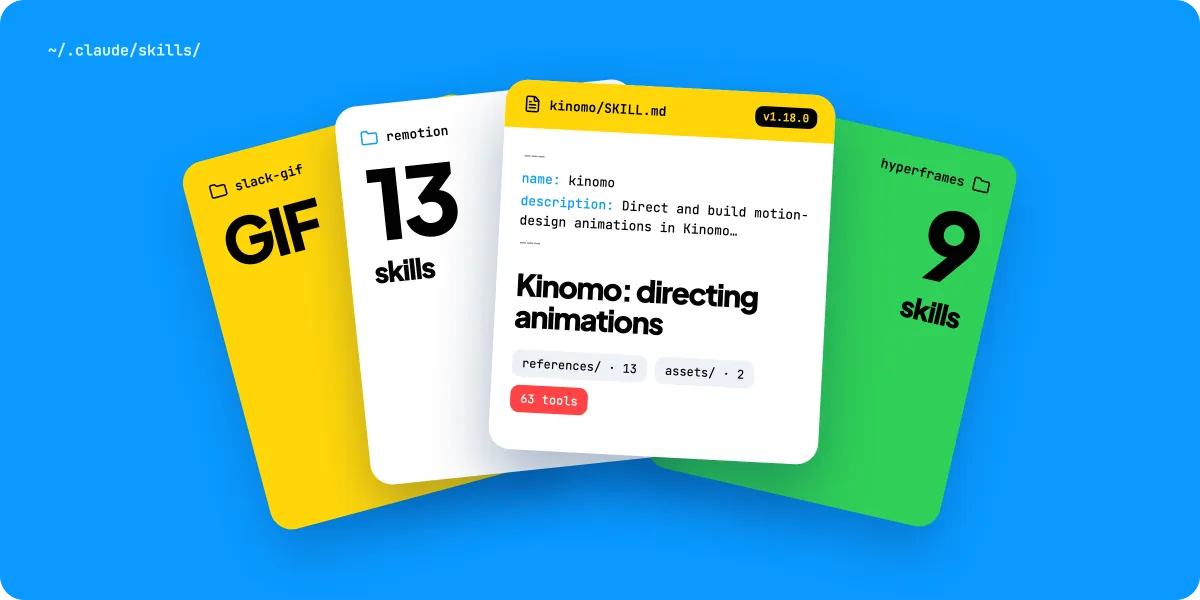
Remotion's tagline is “Make videos programmatically”: you create videos and motion graphics with React. It ships 13 official Agent Skills that give coding agents such as Claude Code, Codex and Cursor current Remotion guidance. A new project with the skills installed starts with:
npx create-video@latest --skillsRemotion is free for individuals and companies of up to 3 people. Larger companies need a Company License, from $25 per seat per month.
HyperFrames
HyperFrames, from HeyGen, writes videos as HTML, CSS and JavaScript, “timed with data attributes and a paused animation timeline”. The framework, CLI and skills are open source under Apache 2.0, and local rendering needs FFmpeg but no account. In Claude Code, you install it as a plugin, then preview and render from the command line:
claude plugin marketplace add heygen-com/hyperframes
claude plugin install hyperframes@hyperframes

npx hyperframes preview
npx hyperframes render --output final.mp4
HyperFrames also offers a hosted connector for Claude, ChatGPT and Grok. It's in beta, needs a HeyGen account, and “rendering runs on HeyGen infrastructure”.
Good for: developers, templated or data-driven videos, and teams that want the video in version control. Trade-off: every change goes through code. Someone who doesn't read React or HTML can watch the result, but can't easily fix a timing by hand.
Route 2: Claude drives an animation studio over MCP
The Model Context Protocol (MCP) is “an open source standard for AI-tool integrations”. An MCP server gives Claude Code access to a tool's actions. When that tool is an animation app, Claude stops writing a program and starts working in a real editor: it creates scenes, places layers, sets the motion and checks the result, while you watch the project change.
Kinomo is the Mac app we build for this. Here is what it is, as documented:
- Scenes are HTML and CSS layers; motion is data. Each animation block has a target, values, a start, a duration and an ease, such as a named spring. The engine computes every frame from time, so there's no script to debug.
- 61 MCP tools in the 0.8 beta (52 in the 0.7 release) to create projects, build scenes, animate, import media, check and export.
- Every change appears live in the editor. You can take over by hand at any moment: drag a block on the timeline, change a word, move a layer.
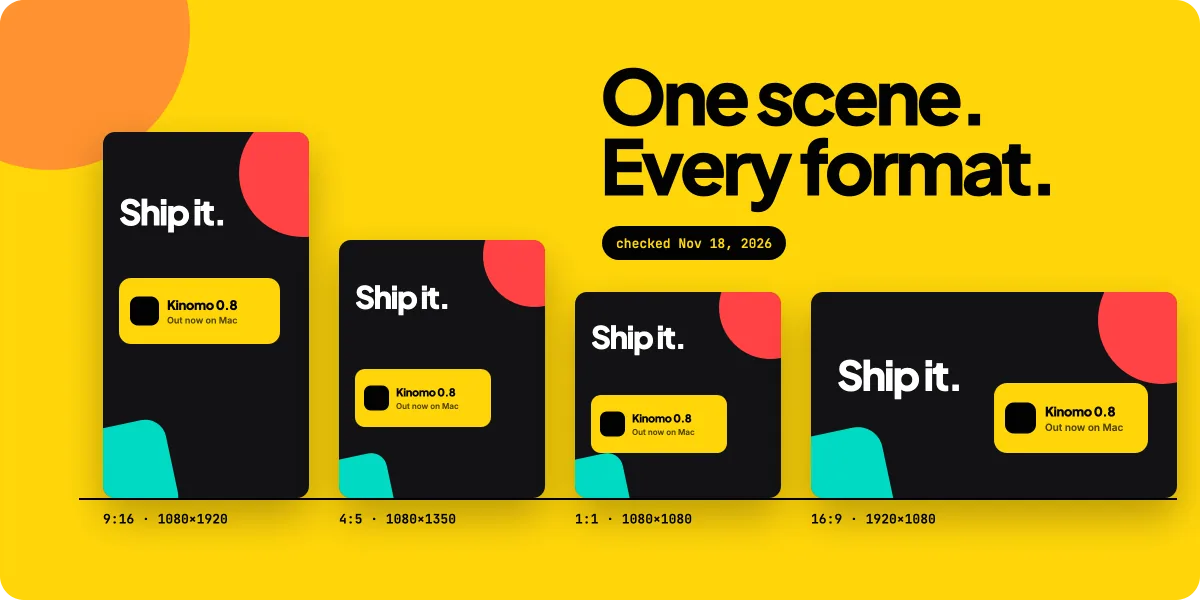
- Every format on one timeline. A scene holds its 16:9, 9:16, 1:1 and 4:5 versions together, each laid out for its shape.
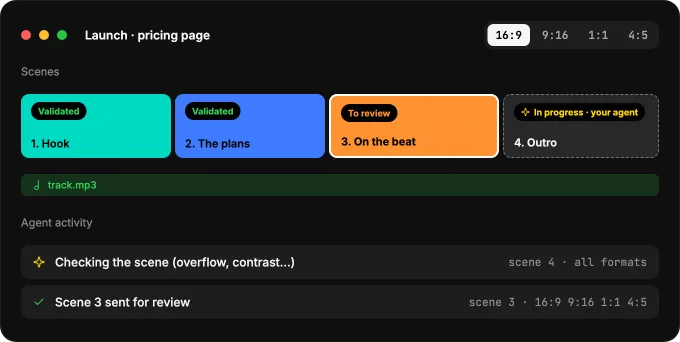
- Built-in checks. The agent checks each scene and the whole animation in every format, and fixes what it finds.
- Review and export. Share a private link where clients pin notes on the frame, then export H.264, HEVC or ProRes, from 720p to 4K, at 24 to 60 fps, rendered on your Mac.
A Kinomo skill teaches Claude how to direct the animation: brief, art direction agreed in the chat before any scene, timing, transitions and review. The app installs it where Claude Code reads personal skills, ~/.claude/skills/kinomo.
Kinomo works well with the code route. A Remotion or HyperFrames render can sit on Kinomo's timeline as a video scene, next to scenes your agent builds as layers. See how Remotion and Kinomo work together and finishing HyperFrames videos in Kinomo.
Good for: product demos, launch videos, explainers and social posts in several formats, especially when a designer or a client will ask for changes. Trade-off: it's a Mac app (macOS 15 or later, Apple silicon), and it isn't built to batch-render thousands of personalised videos from data. Remotion is the better fit there.
Route 3: Claude calls a video generator as a tool
When you need footage that can't be built from layers, such as a product in real light or a drone shot over a city, use a generator and let Claude drive it. Runway MCP brings image and video generation into Claude.ai, Claude Desktop, ChatGPT, Cursor and other MCP clients. Generations use your Runway credits, just like the Runway app, and the models available depend on your Runway plan.
This is the only route where pixels are generated by a model. Claude chooses and writes the prompts; the generator renders the clip.
Good for: b-roll, establishing shots, shots you can't film. Trade-off: the clip is a finished picture. Text inside it isn't editable, and another aspect ratio means generating again, cropping or extending. The usual answer is to drop the generated clip into an edit built with one of the other routes. Kinomo, for example, imports MP4, MOV or WebM clips as video scenes you frame for each format.
Which route for which job
| Claude Motion | Code (Remotion, HyperFrames) | Studio over MCP (Kinomo) | Generator as a tool (Runway MCP) | |
|---|---|---|---|---|
| What Claude writes | Animation code inside Claude | A React or HTML composition | Scenes, layers and motion data in a project | A prompt |
| What you get | Short animation, MP4 | Code you render to video | An editable project, then MP4 or ProRes | A generated clip |
| Change one word | Ask Claude or edit in the editor | Edit the code, render again | Edit the layer or ask the agent | Generate again |
| Several formats | Not documented | One composition per size | 16:9, 9:16, 1:1, 4:5 on one timeline | One aspect ratio per clip |
| Where it runs | Inside Claude (Artifacts) | Your machine or a cloud renderer | Your Mac | The provider's cloud |
| Cost | Team or Enterprise plan | Remotion: free up to 3 people; HyperFrames: free and open source | Free plan. Paid plans from $50/year. | Runway credits |
A simple rule: if the words, numbers or logo must be exact, build; if the picture must look filmed, generate. For a deeper look at the build side, see our comparison of motion graphics software for Mac.
Step by step: a first video with Claude Code and Kinomo
This walkthrough uses Claude Code in a terminal. The same Connect an agent sheet also sets up the Claude desktop app, Cursor, VS Code, Codex and Gemini CLI.
1. Install Kinomo. Download Kinomo and open it once. It runs on macOS 15 or later, on Apple silicon.
2. Connect Claude Code. In Kinomo, choose Help › Connect an Agent… and click Add to Claude Code. The button runs the command for you when it finds the claude CLI; otherwise it shows the command to paste in a terminal. The command registers Kinomo for all your projects (user scope) and points to a small launcher the app keeps up to date.
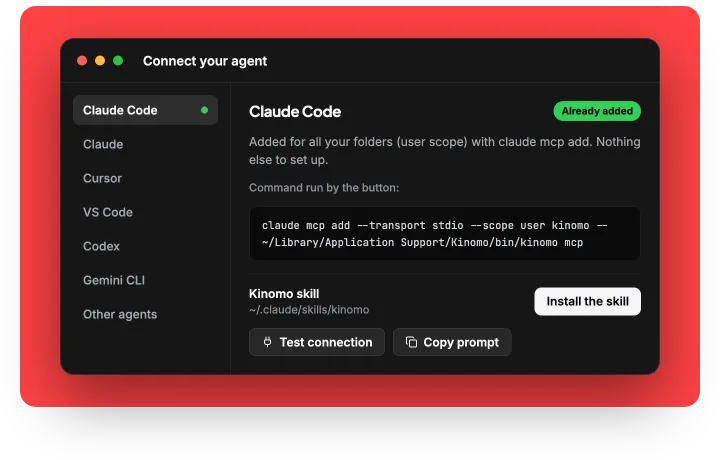
claude mcp add --transport stdio --scope user kinomo -- "$HOME/Library/Application Support/Kinomo/bin/kinomo" mcpThe -- separates Claude Code's own options from the command that starts the server.
3. Install the skill. In the same sheet, click Install the skill. It copies the Kinomo skill to ~/.claude/skills/kinomo. Start a new Claude Code session so it loads.
4. Check the connection. In a terminal, list your servers. Kinomo should show a connected status. Inside Claude Code, /mcp shows the same, and the sheet's Test connection button checks the server from the app's side.
claude mcp list5. Brief Claude. Paste the prompt the sheet gives you, or write your own. Say who will watch, the one thing to remember, the formats, the length and the material you have (logo, screenshots, music). Following the skill, Claude proposes a direction in the chat first and waits for your answer before it builds any scene.
6. Watch, then take over. Once you approve, scenes appear in Kinomo as Claude builds them. Each scene carries a status (in progress, to review, validated). Drag a block to retime it, fix a word, or leave a comment for Claude to act on.
7. Review and export. Ask Claude to check the whole animation, then export from the app or ask Claude to export. Send a private review link if someone else has to sign off.
Limits worth knowing
Every route has real limits. Know them before you promise a client a video.
- No footage without a generator. Code and studio routes animate what you give them: text, shapes, your images, your screenshots, your music. People and real-world scenes need a generator or a camera.
- Claude Motion is narrow for now. It's a beta on Team and Enterprise plans, aimed at short explainers, and it counts toward your usage limits.
- Code routes need a developer setup. Node.js, a terminal and, for HyperFrames, FFmpeg. Fixes go through code.
- Kinomo is Mac only. It needs macOS 15 or later on Apple silicon. Agents on the web (Claude.ai, ChatGPT) can reach it through the relay at kinomo.app/mcp, off by default, which forwards calls to your Mac when the app is online.
- Generated clips change every time. The same prompt can give a different clip, and on-screen text is part of the pixels.
- The brief still matters. An agent with a vague brief makes a vague video. Material, audience and a clear “one thing to remember” do more for the result than any tool choice.
Frequently asked questions
Is Claude good for videos?
Yes, for videos built from text, data, interfaces and brand elements: explainers, product demos, launch videos, social posts. Claude writes the scenes and the timing through code or an animation app. It's not the right tool for realistic footage, which needs a video generator.
Can Claude make reels?
Yes, as long as the reel is animation rather than filmed footage. In Remotion and HyperFrames, each composition has its own width and height, so a vertical composition gives you a reel. In Kinomo, the 9:16 version of each scene sits next to the 16:9, 1:1 and 4:5 versions on the same timeline, each laid out for its shape.
Is Claude free for videos?
Not entirely. Claude Motion requires a Team or Enterprise plan. Remotion is free for individuals and companies of up to 3 people, HyperFrames is open source, and Kinomo: Free plan. Paid plans from $50/year. You still need access to Claude itself, and generators such as Runway bill in credits.
Can Claude edit a video I already have?
Not as a classic video editor. Anthropic's Motion pages describe animations built from a prompt. In Kinomo, you can import an existing MP4, MOV or WebM clip as a scene and have Claude build animated scenes, titles and transitions around it.
Can I use Remotion or HyperFrames with Kinomo?
Yes. Render your composition, bring it into Kinomo as a video scene, and finish the edit there: formats, music, client notes and export. Kinomo doesn't render Remotion or HyperFrames code itself: you bring in the render, or your agent rebuilds a HyperFrames scene as Kinomo layers.
Which AI is best for producing videos?
It depends on the video. For realistic footage, a generator such as Runway. For exact text, logos and several formats, an agent like Claude building the video through code or an animation studio. Many teams combine both in one edit.
Conclusion
Claude doesn't make video the way a generator does, and that's often an advantage: what Claude builds stays editable.
- Need a quick explainer inside Claude? Try Claude Motion if your plan has it.
- Writing code anyway? Remotion or HyperFrames.
- Want to watch the video being built, fix it by hand and ship every format? Connect Claude to Kinomo.
- Need real-looking footage? Call a generator, then cut it into a built edit.
Free plan. Paid plans from $50/year. Download Kinomo, connect Claude Code and ask for your first scene.
Sources · checked on Nov 16, 2026
- Claude Help Center, “Can Claude produce images?” · support.claude.com/en/articles/9002504
- Claude Help Center, “Get started with Claude Motion” · support.claude.com/en/articles/17454997
- Claude, “Build live dashboards and animate explainers with Claude”, Oct 8, 2026 · claude.com/resources/articles/dashboards-and-motion
- Claude Code docs, MCP · code.claude.com/docs/en/mcp
- Claude Code docs, Skills · code.claude.com/docs/en/skills
- Remotion home page · remotion.dev
- Remotion docs, Agent Skills · remotion.dev/docs/ai/skills
- Remotion docs, License and pricing · remotion.dev/docs/license/pricing
- HyperFrames FAQ · hyperframes.heygen.com/faq
- HyperFrames, Create through an AI chat (MCP) · hyperframes.heygen.com/guides/mcp
- Runway MCP · runway.com/mcp
- Kinomo documentation: MCP tools, Connect an agent, skill, formats and export (Kinomo 0.8.0 beta 3, Nov 15, 2026)
Remotion, HyperFrames, HeyGen, Runway, Claude and Anthropic are trademarks of their owners. Kinomo is our product; this article compares public information.